Assista: The AI helper in Analytica:
Transparent Decision Intelligence
AI chatbots operate as “black boxes”—generating text and code without context, accountability, or transparency. In high-stakes decision-making, that isn’t enough. You need an open-box decision model: a transparent, shared representation of the assumptions and calculations on which to collaborate.
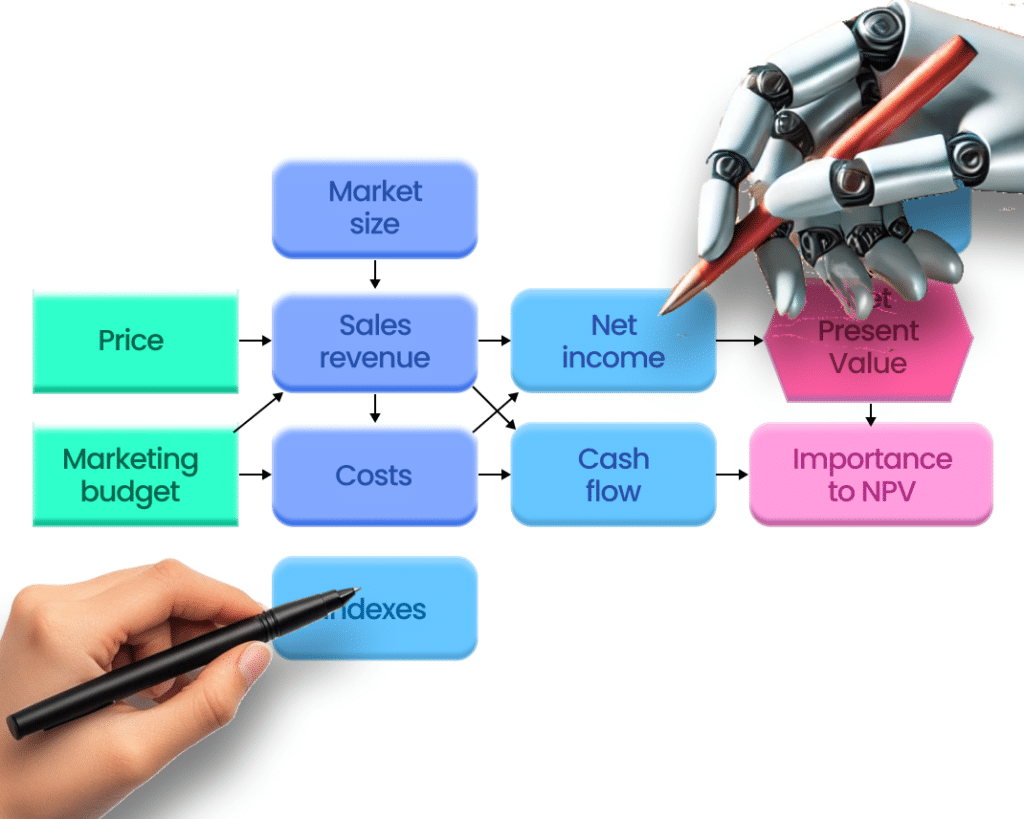
Assista is the first AI collaborator built to show its work. It integrates a familiar chat interface with Analytica’s visual influence diagrams, helping you build models, draw diagrams, write expressions, and explain insights. Whether you are a novice who is learning the ropes or an expert accelerating your workflow, Assista acts as an integrated productivity tool as you work with Analytica.
It makes for a new kind of collaborative modeling process that we call Transparent Decision Intelligence.
Assista is included in all desktop editions of Analytica, even Free Analytica.
Work Smarter with Assista: influence diagrams
Assista is a time-saving AI assistant to help analysts with decision modeling, risk analysis, and complex data exploration.
Instead of breaking focus to search documentation or manually refine your model, Assista helps where you need it, when you need it, in your own language (not only English!).
- Faster Problem-Solving: Ask complex questions, get instant answers
- Seamless UI Interaction: Modify settings, adjust visuals, and refine models with a single command
- Model Structuring Made Easy: Get help building your model and including the important variables and influences.
- Use your own language —Write prompts in English, French, Spanish, and other common languages, and it answers in your own language.
See Assista in Action
What You Can Do with Assista
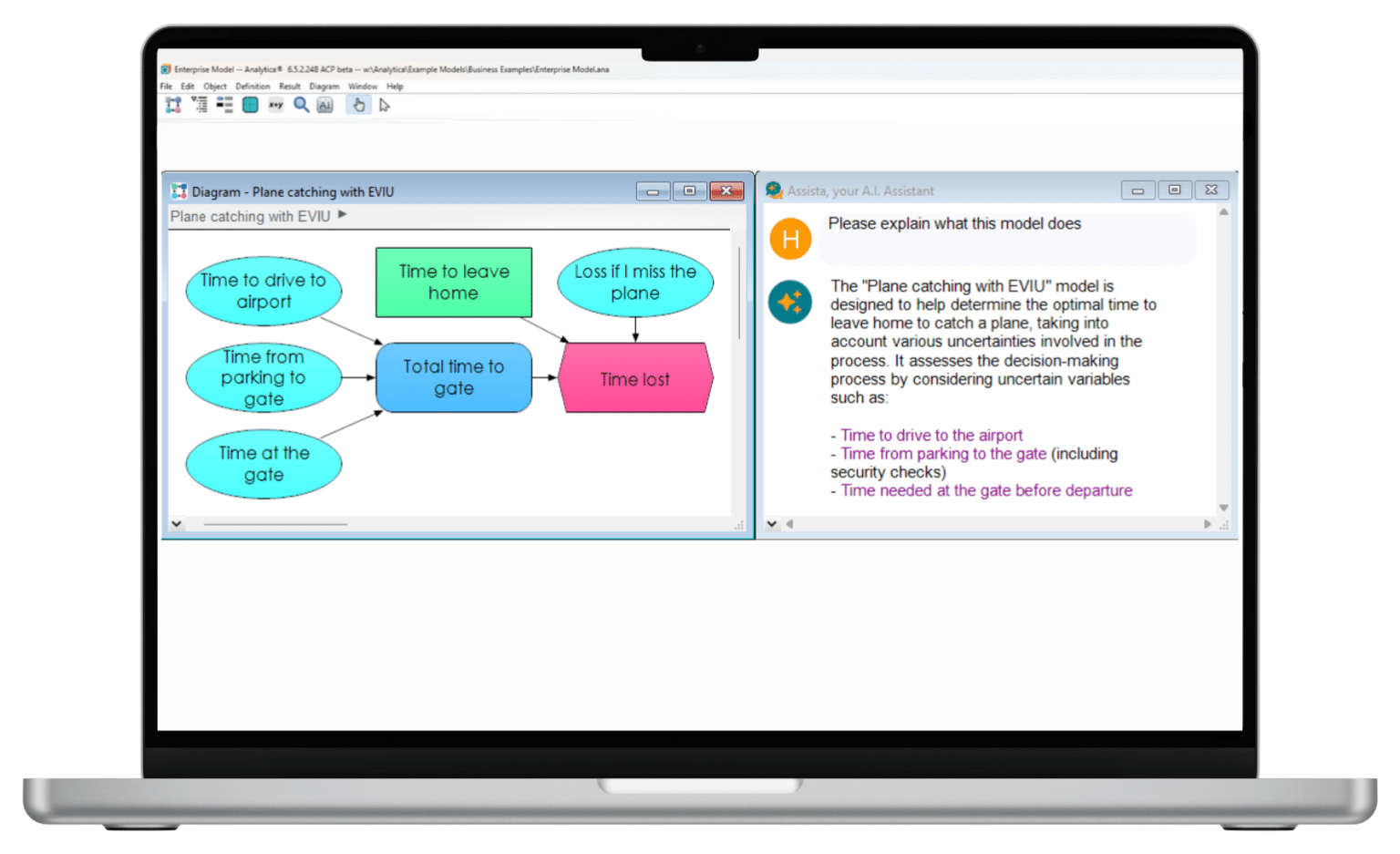
Assista transforms how you work with Analytica. Use the chat window to add variables, write definitions, or change styles—all without needing to dive into the user guide. Assista offers expertise not just in Analytica, but also in problem structuring and model design.
| What You Need | Sample request | What Assista does |
|---|---|---|
|
How do I do X?
|
“How can I share my model on the web?”
“How do I find the optimal strategy?”
|
Finds features and functions, even when you don’t know their names.
Gives step-by-step instructions. Or does it for you. |
|
Understand a model |
“How does it calculate revenue?”
“What does this model do?” |
Explains what each variable or module does, or summarizes the entire model. |
|
Get insights |
“What are insights and recommendations from this result?” |
Points out the peaks and valleys, cross-over points, most appealing options, surprises, and explains the most useful insights. |
|
Build a model |
“Build a model to compare technology options to power a new data center.” |
Builds an initial model, designs clear influence diagrams, estimates key inputs, and writes clear formulas. |
|
Write definitions
|
“Model how prices affect sales based on elasticity.”
|
Generates Analytica Definitions. Very helpful when you aren’t sure of function names or syntax.
|
|
Import data |
“Read tables from this spreadsheet, (PDF, or CSV file), and convert to tables.”
“(You can simply drag files into the Assista window.)” |
Converts tables into Analytica arrays, adding new indexes for each dimension as needed. |
|
Change settings |
“Increase diagram font size.”
“Make this node purple.” |
Modifies model settings without you having to read the user guide to learn menus and dialog boxes. |
|
Document |
“Add descriptions and units to objects missing them.”
“Write a PDF user guide for this model.” |
Writes documentation within the model, or as a separate document. |
|
Critique |
“What are the key limitations or weaknesses?”
“How can we fix them?” |
Lists salient problems and missing variables in your model. Suggests how to fix them with priorities. |
|
Use another language |
“Erkläre dieses Modell.”
“Expliquez-moi ce qui se passe.” |
Assista understands common languages and replies in the same language. |
How Assista Works
- Understands Your Models – Reads variable relationships and UI context to provide relevant insights.
- Finds the Right Information Fast – Pulls documentation, best practices, and modeling logic instantly.
- Automates Repetitive Tasks – Handles UI changes, writes descriptions, and generates functions.
- Structures Complex Models – Helps define key variables, dependencies, and forecasting logic.
- Simplifies Data Interpretation – Generates visual insights and clear explanations for decision-making.
Unlike general AI assistants, Assista is designed specifically for Analytica users. It doesn’t just provide generic answers—it understands Analytica and your model so that it can and provides give relevantprecise, context-aware assistance.
Mistakes and the value of a shared model
Like any AI, Assista is fallible. But its integration within Analytica provides a unique safeguard. Because you collaborate with Assista via a shared model, you can immediately see its assumptions and formulas. You can fix issues yourself or ask Assista to iterate, ensuring the final result is robust and understood.
Spreadsheets and procedural code, like Python, often hide logic in “black boxes,” making errors difficult to spot. Analytica was designed from inception to be transparent. Through Influence Diagrams, Intelligent Arrays, and a declarative Flow Architecture, every dependency is explicit. Assista is an open-box collaborator that makes it easy to scrutinize each variable and calculation.
What Users Are Saying
“Fantastic work on Assista! We were all blown away by the amazing things it can do, like coming up with intelligent suggestions on modeling price sensitivity as well as solutions in Analytica modeling.”

Jim Lipkis
Monaco Rick Analytics,
Inc, Los Altos, California
“I have made great use of Assista. It works extremely well, and has accelerated my model building, especially when I get rusty and can’t quite remember how I implemented something long ago. It also helps increase the quality of the models when I ask it to check the architecture and function of my models. It quickly points out potential issues or weaknesses. I really like that I can ask it to make changes to existing variables or generate new ones.”

Scott Sidener
Westinghouse Electric Company, USA
How can I try Assista?
- All editions of Analytica include Assista — even the Free edition.
FAQ: What You Need to Know
Assista is an AI assistant for Analytica that helps you save time by automating tasks, answering questions, and streamlining your modeling workflow.
Assista doesn’t just show documentation—it can explain and document your model, performs actions, add variables, draw diagrams, and write definitions. It helps you work faster by reducing manual searches and repetitive steps.
It eliminates the need to manually search for documentation, tweak UI elements, or write functions from scratch. Instead of spending hours solving minor issues, Assista answers your questions directly.
No, Assista works with plain English. Simply type your request naturally, such as “Explain the Piecewise function” or “Change the background color,” and it will respond directlyinstantly.
Yes, it can modify settings, update UI elements, generate descriptions, and even create functions upon request. By reducing manual input, Assista allows you to focus on model refinement instead of tedious adjustments.
Assista pulls directly from Analytica’s documentation and understands your model’s structure, ensuring relevant and context-aware suggestions. Llike any large language model, it is often surprisingly helpful but it also makes mistakes. You should always verify critical outputs.
No, Assista needs an internet connection to access AI-powered assistance on a Lumina server which in turn may query OpenAI (or other large language models).
Assista processes user queries by accessing relevant parts of the model but does not transfer the entire model to the server. However, portions of the model and the full chat history are sent to the Assista server and logged for quality improvement. Lumina takes care to protect proprietary information. While we may use logged data to refine Assista and may incorporate some queries into our internal eval sets, we are very careful to not include proprietary content in training datasets. This same data is also transmitted to OpenAI’s API, whose guidelines state that its API does not use submitted data for training. All communication is encrypted to ensure security.
Data analysts save time by getting instant function explanations. Decision scientists receive structured guidance on complex modeling. Business intelligence teams accelerate model-building and analysis, making data-driven decisions faster and more effective.
Very much so. By explaining models, helping with software questions, finding relevant Analytica docs, building models, and writing expressions, speeds the learning curve, making Analytica more accessible to both new and experienced users.
Yes! Assista will continue to evolve, benefiting from real user interactions and feedback, including "thumbs down" responses that help us refine its answers. As large language models advance, Assista will become even more powerful, making it an increasingly valuable tool for decision modeling. While already useful today, future improvements will make it an essential and transformative part of the Analytica experience.
If you’re using Analytica, Assista is already integrated—just access it from the toolbar. You can even use it with Free Analytica or book a demo to see how it transforms your modeling workflow.
See also
Why Analytica
What is Analytica software?

Tools & methods